
Features
Detailed guide to Semantica's capabilities.
AI Attribution
Determines what percentage of a commit is AI-attributed by comparing added lines against captured AI tool output.
How it works
When you run semantica blame or semantica explain, Semantica diffs the commit against its parent and checks each added line against output captured from AI agent sessions. Lines are classified into three tiers:
| Tier | Name | What it means |
|---|---|---|
| Exact | ai_exact | Line matches AI tool output character-for-character (after trimming whitespace) |
| Formatted | ai_formatted | Match after stripping all whitespace - catches linter/formatter changes (e.g., func foo(){ vs func foo() {) |
| Modified | ai_modified | Line is in a diff hunk that overlaps with AI output but doesn't match exactly - the developer likely edited AI-generated code |
AI code hashes are built from assistant-role events containing Edit (new_string field) and Write (content field) tool calls captured during provider hook events. Bash tool calls are only used to detect file deletions (via rm commands), not to build line-level code matches.
What you see
semantica blame HEAD          # aggregate AI percentage
semantica blame HEAD --json   # per-file breakdown with exact/formatted/modified counts
The JSON output includes per-file ai_percentage, per-provider breakdown (provider name, model, AI lines), and diagnostics (events considered, payloads loaded, match counts).
Prerequisites
- Semantica enabled in the repo
- At least one AI provider with hooks installed
- Agent session activity that overlaps with the commit's time window
Caveats
- Attribution is anchored to the delta window between commit-linked checkpoints. Deferred created files can still pick up AI attribution from earlier history when they were present in the previous commit-linked manifest but committed later.
- Lines that a developer manually edits after AI generation may count as "modified" rather than "exact."
- Carry-forward is per-file, not per-line across windows. If a file already has current-window AI attribution, that file stays current-window authoritative.
- Provider-level attribution (file touched by AI) is available for all providers; line-level payload analysis requires providers that report Edit/Write tool call content.
Checkpoints and Rewind
Checkpoints are point-in-time snapshots of every file in the repo. Rewind restores the working tree to any previous checkpoint.
How it works
Automatic checkpoints are created on every git commit:
- The pre-commit hook creates a pending checkpoint stub (UUID, timestamp)
- The background worker completes it by hashing every tracked file plus untracked, non-ignored files (SHA-256, zstd compressed) and writing a manifest (path -> blob hash mapping)
Manual checkpoints can be created at any time:
semantica checkpoint -m "Before big refactor"
Rewind restores files from a checkpoint's manifest:
semantica rewind <checkpoint_id>            # restore files, create safety checkpoint first
semantica rewind <checkpoint_id> --exact    # also delete files not in the checkpoint
semantica rewind <checkpoint_id> --no-safety  # skip safety checkpoint (dangerous)
By default, rewind creates a safety checkpoint before restoring, so you can undo the rewind.
What you see
semantica list                  # checkpoints with ID, timestamp, commit hash, file count
semantica show <id>             # full manifest with per-file blob hashes
semantica rewind <id> --json    # files_restored, files_deleted, safety_checkpoint_id
Caveats
- Rewind operates on the working tree only - it does not modify git history, staged changes, or the index.
- Manifests include git-tracked files plus untracked, non-ignored files. Ignored files are not captured or restored.
- The
--exactflag deletes files not present in the checkpoint manifest, but always protects.semantica/.
Commit Trailers
Semantica always appends a machine-readable checkpoint trailer during the commit-msg hook. Attribution and diagnostics trailers are enabled by default and can be toggled with semantica set trailers enabled|disabled.
How it works
The pre-commit hook writes a handoff file (.semantica/.pre-commit-checkpoint) containing the checkpoint ID and timestamp. The commit-msg hook reads this file and appends trailers to the commit message.
When trailer emission is enabled and AI is detected, the trailers look like this:
Semantica-Checkpoint: chk_abc123
Semantica-Attribution: 42% claude_code (sonnet) (18/43 lines)
Semantica-Diagnostics: 3 files, lines: 15 exact, 2 modified, 1 formatted
- Checkpoint - links the commit to its checkpoint ID
- Attribution - per-provider AI percentage with line counts (one trailer per provider if multiple contributed). If no AI matches the commit, this becomes
0% AI detected (0/N lines). - Diagnostics - aggregate match statistics. If no AI matches the commit, this explains whether no AI events existed in the checkpoint window or whether AI events existed but did not match the committed files.
When trailer emission is disabled:
Semantica-Checkpoint: chk_abc123
When no AI sessions exist in the checkpoint window:
Semantica-Checkpoint: chk_abc123
Semantica-Attribution: 0% AI detected (0/141 lines)
Semantica-Diagnostics: no AI events found in the checkpoint window
When AI sessions exist but do not modify the committed files:
Semantica-Checkpoint: chk_abc123
Semantica-Attribution: 0% AI detected (0/141 lines)
Semantica-Diagnostics: AI session events found, but no file-modifying changes matched this commit
Prerequisites
- Semantica enabled (
semantica enable) - Git hooks installed (happens automatically during enable)
- Attribution and diagnostics trailers enabled if you want those extra trailers (
semantica set trailers enabled)
Caveats
- Trailers are skipped if the handoff file is missing (e.g.,
git commit --no-verifyskips the pre-commit hook). - Duplicate trailers are prevented - if a
Semantica-Checkpointtrailer already exists (e.g.,git commit --amend), it won't be added again. Semantica-Checkpointis always appended when trailer insertion runs.Semantica-AttributionandSemantica-Diagnosticsare controlled together by thetrailerssetting.- Attribution trailers are best-effort. If attribution cannot be computed at all (for example, the database is unavailable or the hook times out) and trailer emission is enabled, Semantica appends the checkpoint trailer plus
Semantica-Diagnostics: attribution unavailable.
Playbooks and Search
Playbooks are LLM-generated structured summaries of commits. Search lets you find past solutions by keyword.
How it works
A playbook is generated by sending the commit diff, attribution stats, and recent session transcript to an LLM. The response is parsed into a structured format:
| Field | Description |
|---|---|
title | Short label (max 10 words) |
intent | What the developer tried to accomplish |
outcome | What was actually achieved |
learnings | Codebase patterns/conventions discovered |
friction | Problems, blockers, annoyances encountered |
open_items | Deferred work, tech debt |
keywords | 5-10 search terms for later discovery |
Playbooks are indexed in an FTS5 full-text search table. All narrative fields are searchable.
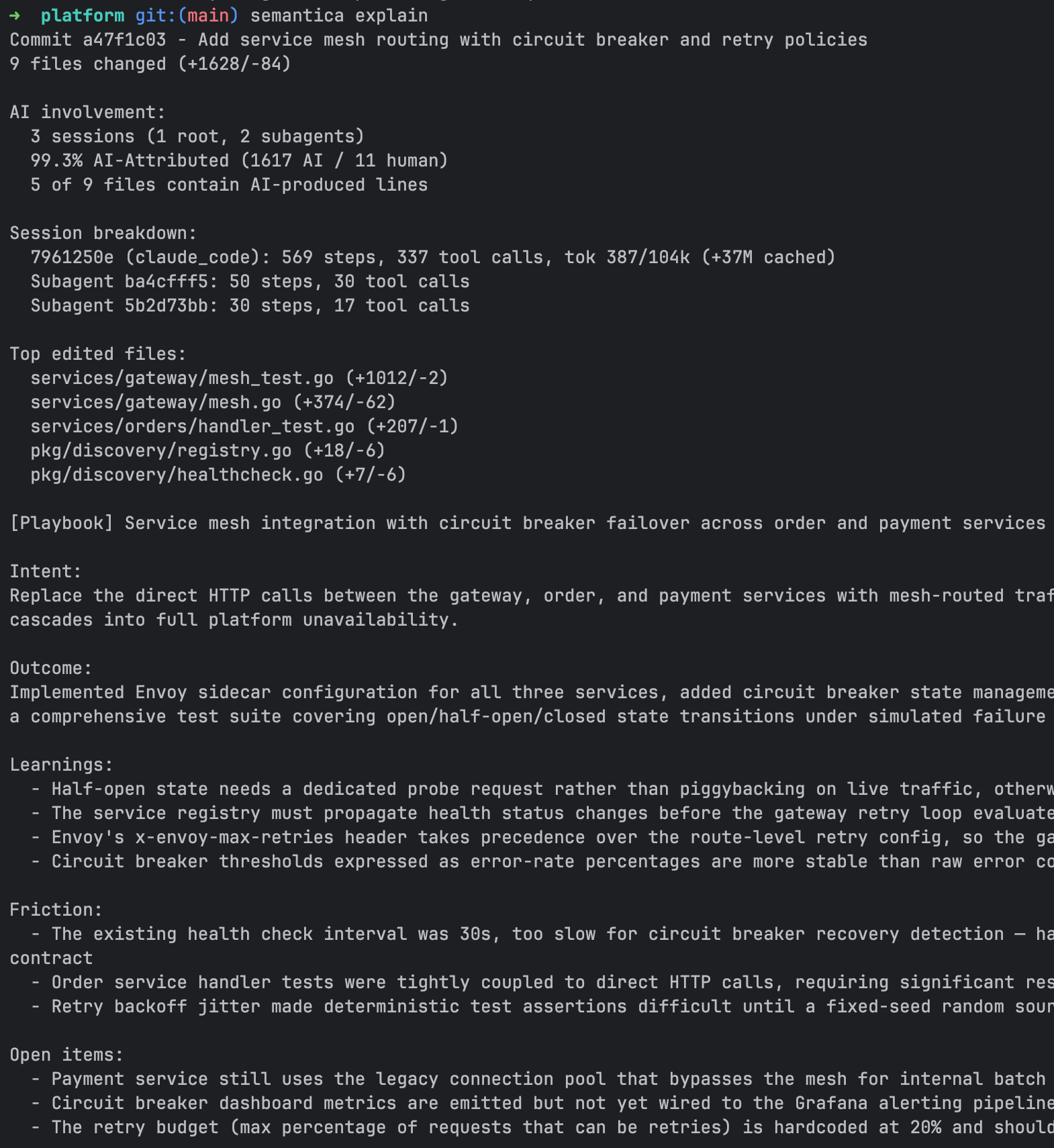
What you see
# Generate a playbook for a commit
semantica explain HEAD --generate

# Search past playbooks
semantica search "auth token refresh"
semantica search "database migration" --json
Search results are ranked by BM25 relevance and include commit hash, AI percentage, model used, and the full summary.
Generation modes
- Manual:
semantica explain <commit> --generate(use--forceto regenerate) - Auto: Enable with
semantica set auto-playbook enabled- generates a playbook for every commit via a detached background process after the worker completes
Prerequisites
- At least one LLM CLI must be installed and accessible: Claude Code (
claude), Cursor CLI (agent), Gemini CLI (gemini), or Copilot CLI (copilot). The first available provider in this order is used. - For auto-playbook, the provider must be authenticated and available non-interactively.
Caveats
- Generation is asynchronous. After
--generate, runsemantica explainagain after a few seconds to see the result. - Playbook generation uses bounded diff input to stay within LLM context limits. Commit message and PR suggestions use structured change summaries plus selected per-file excerpts instead of a blind raw-diff prefix. Large diffs may still produce less precise summaries.
- Playbooks are stored locally in
.semantica/lineage.db. They are included in backend sync when the repo is connected withsemantica connect.
Hosted Reporting and Remote Attribution Push
The CLI computes attribution locally and can optionally push it to the Semantica backend. The backend materializes hosted reporting surfaces - GitHub PR comments and check runs, GitLab MR comments and commit statuses, and dashboards. That provider integration logic does not live in this repository.
Local-only mode works without any backend. All capture, attribution, checkpoints, playbooks, and search features are fully functional offline.
How it works
After the background worker completes a checkpoint, it POSTs an attribution payload to the effective backend endpoint at /v1/attribution when the repo is connected. The payload includes:
- Git metadata (remote URL, branch, commit hash, subject)
- Repo provider hint (
github,gitlab, orunknown) - Full attribution breakdown (exact/formatted/modified line counts, per-file detail)
- Per-provider detail (provider name, model, AI lines)
- Session count and provider list
- Playbook summary (if available)
- CLI version and attribution algorithm version
The backend uses this data to render:
- PR or MR comments - AI attribution summary on GitHub pull requests or GitLab merge requests
- Provider status surfaces - GitHub check runs and GitLab commit statuses on commits
- Dashboards - team-level AI usage trends and per-repo breakdowns
Authentication uses a bearer token obtained via semantica auth login (OAuth device flow) or the SEMANTICA_API_KEY environment variable.
What you see
semantica auth login                    # authenticate once with the backend
semantica connect                       # connect this repo to the dashboard
Prerequisites
- Authenticated via
semantica auth loginorSEMANTICA_API_KEY - Repo connected via
semantica connect - Backend provisioned for your organization if you want hosted reporting surfaces
- GitHub App installed if you want GitHub PR comments and check runs
- GitLab project webhook configured if you want GitLab MR comments and commit statuses
The backend endpoint is resolved from the authenticated session. SEMANTICA_ENDPOINT overrides it for local development and testing.
Caveats
- Push is best-effort with a 10-second timeout. Failures are logged to
.semantica/worker.logbut never block the worker or the commit. - A second push happens after auto-playbook generation completes, enriching the payload with the
playbook_summaryfield. semantica auth logindoes not connect any repos. Connection is a repo-local action controlled bysemantica connectandsemantica disconnect.- The backend canonicalizes the
remote_url(handles SSH vs HTTPS,.gitsuffix) to match repos across push sources. - Provider comments, status surfaces, and dashboards are implemented in the backend/API repository, not in this CLI. See docs/github-reporting.md for details.
Egress Redaction
Semantica redacts likely secrets before prompt content or remote attribution payloads leave the machine. Local capture and stored blobs remain unchanged.
How it works
- LLM prompt content is redacted at the shared
llm.Generate/llm.GenerateTextboundary. - Remote attribution payloads are sanitized before upload.
remote_urlhas embedded credentials, query strings, and fragments stripped before the rest of the payload is scanned. - Detection uses embedded Gitleaks rules. Matched values are replaced with
[REDACTED].
Caveats
- Redaction is best-effort. Unknown secret formats may still be missed.
- Aggressive matches can remove prompt context and reduce LLM output quality on some diffs or summaries.
- Redaction applies to outbound content only. Local raw capture in
.semantica/is not rewritten.
MCP Integration
Exposes Semantica tools to AI agents via the Model Context Protocol, allowing agents to search past solutions and record attribution natively.
How it works
semantica mcp enable writes MCP server configuration to each supported provider's config file. The server runs over stdio using JSON-RPC 2.0, started on demand by the agent.
Three tools are exposed:
| Tool | Input | What it does |
|---|---|---|
semantica_search | {query, limit?} | Full-text search across playbook summaries (FTS5 BM25 ranking) |
semantica_playbook_use | {commit_hash, note?} | Records that the agent applied a past playbook |
semantica_explain | {ref} | Returns full commit explanation with attribution, sessions, and summary |
What you see
semantica mcp enable    # install MCP config for all detected providers
semantica mcp status    # show which providers have MCP configured
semantica mcp disable   # remove MCP config
Once enabled, agents can call these tools during conversations. For example, an agent can search for how a similar problem was solved before and apply that playbook to the current task.
Supported providers
| Provider | Config path | Scope |
|---|---|---|
| Claude Code | .mcp.json | Per-project |
| Cursor | .cursor/mcp.json | Per-project |
| Kiro IDE | .kiro/settings/mcp.json | Per-project |
| Kiro CLI | .kiro/agents/semantica.json | Per-project |
| Gemini CLI | ~/.gemini/settings.json | Global |
| Copilot CLI | .copilot/mcp-config.json | Per-project |
Caveats
- The MCP server is stateless - each invocation reads from
.semantica/lineage.dband returns results. - Search requires playbooks to exist. If no playbooks have been generated, search returns empty results.
Provider Hook Capture
Real-time capture of AI agent activity via provider-specific hooks.
How it works
When semantica enable detects an AI provider, it installs hooks in the provider's configuration file. These hooks call semantica capture <provider> <hook-name> with event metadata on stdin.
The capture lifecycle follows this pattern:
- Prompt submitted - Semantica records the current transcript boundary to a capture state file at
$SEMANTICA_HOME/capture/capture-{key}.json. The offset format is provider-specific: line count for JSONL-based providers, message index for Gemini, and provider-managed markers for Kiro CLI. - Agent stop - Semantica reads the transcript from the saved offset forward, extracts new events (tool calls, responses, file operations), and routes them through the broker to the correct repo's database.
- Session close - Final transcript flush and state cleanup.
Events are matched to repositories by file path (deepest-match rule). Events without file paths are matched by the session's source project path.
Event types
| Type | When it fires |
|---|---|
PromptSubmitted | User submits a prompt - saves transcript offset |
AgentCompleted | Agent finishes responding - captures and routes events |
SessionOpened | Session starts - lifecycle tracking |
SessionClosed | Session ends - fallback capture if completion was missed |
ContextCompacted | Context window compressed - resets offset to EOF |
SubagentCompleted | Sub-agent finishes - captures sub-agent transcript |
Prerequisites
- Provider detected and hooks installed (
semantica enableorsemantica agents) semanticabinary on PATH (hooks invoke it by absolute path or viacommand -v)
Caveats
- Capture state is stored in
$SEMANTICA_HOME/capture/. The boundary format is provider-specific and may use companion state managed by the provider. If the CLI is upgraded or the capture directory is cleared mid-session, some events may be missed. - The background worker runs a reconciliation pass to flush any sessions with pending capture state, ensuring no events are lost if a hook invocation was interrupted.
semantica tidy --applycan remove abandoned capture state, stale broker entries, and orphan playbook FTS rows, and mark old pending checkpoints as failed without touching complete checkpoint history.- Capture is per-machine - activity from a different machine using the same repo is not captured unless that machine also has Semantica enabled.